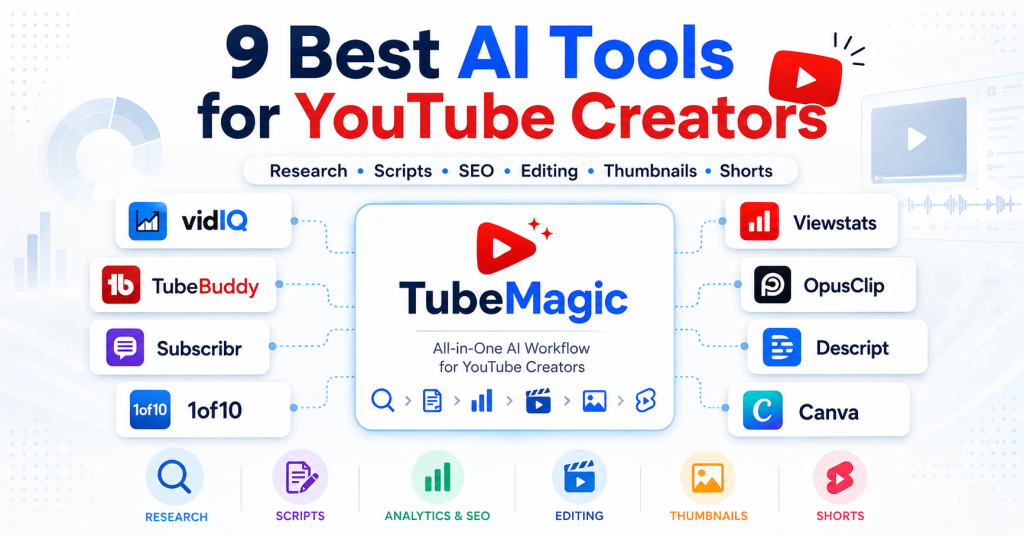
AI tools can now support almost every stage of a YouTube workflow—from researching video ideas and writing scripts to designing thumbnails, optimizing metadata, editing videos, analyzing competitors, and turning long-form content into Shorts. The challenge is choosing the right tool for the part of your workflow that actually needs improvement.
In this guide, we compare nine of the best AI tools for YouTube creators in 2026 and explain which platforms make the most sense for research, scripting, SEO, analytics, video editing, thumbnails, and content repurposing.
Affiliate Disclosure: LumerixLabs may earn a commission from qualifying purchases made through some links on this page, at no additional cost to you. This does not affect our comparisons or recommendations.
Best AI Tools for YouTube Creators: Quick Picks
The best tool depends on what you want AI to do for your channel. Here are our picks for the most common YouTube creator workflows.
- TubeMagic — Best for an all-in-one AI YouTube content workflow
- vidIQ — Best for YouTube SEO and channel-growth intelligence
- TubeBuddy — Best for A/B testing and video optimization
- Subscribr — Best for AI YouTube script writing
- 1of10 — Best for outlier research, ideas, and thumbnails
- Viewstats — Best for competitor and trend research
- OpusClip — Best for turning long videos into Shorts
- Descript — Best for AI video and audio editing
- Canva — Best for thumbnails and visual content
Best all-in-one option: TubeMagic is our preferred choice for creators who want research, video ideas, keyword discovery, AI scripting, thumbnails, titles, descriptions, and other YouTube content tools inside one focused workflow.
How We Chose These AI Tools for YouTube
We selected tools based on the specific YouTube workflow they help improve rather than simply choosing platforms with the longest feature lists. Each recommendation needs to solve a meaningful creator task such as research, scripting, SEO, analytics, packaging, editing, or repurposing.
We also considered whether a tool is designed specifically for YouTube or provides functionality that is particularly useful to YouTube creators. That is why this list includes both dedicated YouTube platforms such as TubeMagic and vidIQ and broader creative tools such as Descript and Canva.
9 Best AI Tools for YouTube Creators Compared
Here’s the quick comparison before we look at each tool in more detail.
|
Tool |
Best For |
Main Strength |
YouTube Workflow Stage |
|
TubeMagic |
All-in-one AI workflow |
Research, ideas, scripts & publishing assets |
Planning → Production |
|
vidIQ |
SEO & growth intelligence |
Keywords, ideas, optimization & channel insights |
Research → Optimization |
|
TubeBuddy |
Testing & optimization |
A/B testing, SEO & channel tools |
Optimization |
|
Subscribr |
AI script writing |
Ideas, voice profiles & retention-focused scripts |
Planning → Scripting |
|
1of10 |
Ideas & packaging |
Outliers, titles & AI thumbnails |
Research → Packaging |
|
Viewstats |
Competitor research |
Trends, competitors, outliers & real-time data |
Research |
|
OpusClip |
Shorts repurposing |
AI clipping, reframing & captions |
Post-production |
|
Descript |
AI video editing |
Text-based editing, captions, audio cleanup & clips |
Production → Editing |
|
Canva |
Thumbnails & visuals |
Templates, AI thumbnails & visual design |
Packaging |
Note: Features, plans, usage limits, and pricing can change. This comparison was reviewed in August 2026 using current information from the official product websites.
TubeMagic — Best for an All-in-One AI YouTube Workflow
TubeMagic is our top pick for creators who want one YouTube-focused AI workflow that covers research, video ideas, keyword discovery, script writing, thumbnails, titles, descriptions, tags, and upload optimization. Its main advantage is breadth: instead of using separate tools for each production stage, creators can move from topic research into content creation inside the same platform.
Why We Like TubeMagic
Best Use Case
TubeMagic makes the most sense for creators whose main bottleneck is content production. It is particularly relevant for active YouTubers, faceless channels, and content teams that regularly need research, scripts, metadata, and publishing assets.
Best for: Creators who want one AI-assisted workflow for research, scripting, packaging, and YouTube optimization.
Read our full TubeMagic Review 2026
vidIQ — Best for YouTube SEO and Channel-Growth Intelligence
vidIQ is a strong choice for creators who want AI assistance combined with keyword research, YouTube SEO, optimization, video ideas, thumbnails, and channel-performance insights. Compared with TubeMagic, vidIQ places more emphasis on understanding what is happening across a channel and using that data to guide future content decisions.
Why We Like vidIQ
Best Use Case
vidIQ is better suited to creators who want AI to support both content planning and channel decision-making. It is especially useful when YouTube SEO, ongoing optimization, and performance intelligence matter more than a dedicated script-production workflow.
Best for: Creators who prioritize YouTube SEO, optimization, keyword research, and channel-growth insights.
See our TubeMagic vs vidIQ 2026 comparison
Visit the official vidIQ website
TubeBuddy — Best for A/B Testing and Video Optimization
TubeBuddy is a YouTube optimization and channel-management platform with a particularly strong focus on keyword research, SEO, A/B testing, analytics, and productivity tools. Its advantage over many AI-first platforms is that it helps creators improve and test videos after they are already part of a growing content library.
Why We Like TubeBuddy
Best Use Case
TubeBuddy is most useful for creators who already publish consistently and want to improve packaging, search optimization, and existing content through testing and structured channel-management tools.
Best for: Established creators who want A/B testing, YouTube SEO, and ongoing channel optimization.
Visit the official TubeBuddy website
Want one tool instead of several? TubeMagic covers more stages of the YouTube content-production workflow than most of the tools above, including research, video ideas, scripts, thumbnails, metadata, and optimization. vidIQ and TubeBuddy are stronger in specific areas such as channel intelligence, SEO, testing, and post-publish optimization.
Subscribr — Best for AI YouTube Script Writing
Subscribr is a specialized AI writing platform built around the YouTube scripting process. Instead of trying to cover every part of channel management, it concentrates on researching ideas, understanding what is working in a niche, developing structured scripts, and helping creators maintain a consistent channel voice.
Why We Like Subscribr
Best Use Case
Subscribr is a strong fit when script production is the most time-consuming part of your YouTube workflow. It is particularly relevant for long-form channels, faceless YouTube businesses, and creators who need to produce structured scripts consistently without starting from a blank page.
Best for: Creators whose main priority is researching ideas and turning them into structured, YouTube-focused scripts.
Visit the official Subscribr website
1of10 — Best for Outlier Research, Ideas, and Thumbnails
1of10 is built around a different approach to YouTube growth: studying videos that significantly outperform a channel’s normal results and using those patterns to inspire new topics, titles, and thumbnails. This makes it especially useful for creators who struggle more with finding promising ideas and packaging them effectively than with writing or editing the video itself.
Why We Like 1of10
Best Use Case
1of10 makes the most sense for creators who already know how to produce videos but need stronger ideas and packaging. It can be particularly valuable when the main challenge is identifying topics with proven demand and creating titles or thumbnails that have a better chance of earning the click.
Best for: Creators who want data-driven inspiration for video ideas, titles, thumbnails, and YouTube packaging.
Visit the official 1of10 website
Viewstats — Best for Competitor and Trend Research
Viewstats is a YouTube analytics and research platform designed to help creators understand what is working across channels, competitors, niches, and individual videos. Its strength is access to real-time YouTube data that can be used to identify outliers, monitor competitors, study successful thumbnails, and spot emerging opportunities before planning the next upload.
Why We Like Viewstats
Best Use Case
Viewstats is best suited to creators who want to make more evidence-based content decisions before production begins. Instead of primarily generating scripts or editing videos, it helps answer questions such as what competitors are publishing, which videos are outperforming expectations, and what topics or packaging styles are gaining traction.
Best for: Creators who prioritize competitor intelligence, outlier discovery, trend research, and data-driven YouTube strategy.
Visit the official Viewstats website
Comparing these specialized tools with TubeMagic? See our guide to the best TubeMagic alternatives in 2026 for a more detailed look at vidIQ, TubeBuddy, Subscribr, 1of10, Viewstats, Taja AI, and OpusClip.
Choose based on your bottleneck: Subscribr is the more specialized choice for script production, 1of10 is stronger for outlier-driven ideas and packaging, and Viewstats is built around competitor and trend intelligence. If you would rather keep research, ideas, scripts, thumbnails, metadata, and optimization inside one broader YouTube workflow, TubeMagic remains the more integrated option.
OpusClip — Best for Turning Long Videos into Shorts
OpusClip is an AI video repurposing platform designed to turn long-form videos into shorter clips for platforms such as YouTube Shorts, TikTok, and Instagram Reels. Instead of requiring creators to manually search through a long recording for usable moments, OpusClip can identify highlights, create clips, reframe them for vertical formats, and add captions automatically.
Why We Like OpusClip
Best Use Case
OpusClip is most useful for creators who already produce long-form YouTube videos, podcasts, interviews, webinars, or similar content and want to extract more value from each recording by republishing the strongest moments as short-form videos.
Best for: Creators who want to repurpose existing long-form content into YouTube Shorts and other vertical social clips with less manual editing.
Visit the official OpusClip website
Descript — Best for AI Video and Audio Editing
Descript takes a different approach to video editing by turning recorded audio and video into an editable transcript. Creators can make many edits by changing the text rather than working entirely inside a traditional timeline, making it especially useful for talking-head videos, tutorials, interviews, podcasts, and other dialogue-heavy YouTube content.
Why We Like Descript
Best Use Case
Descript is a strong choice for YouTubers whose bottleneck is editing rather than research or scripting. Its text-based workflow is particularly useful when the video depends heavily on spoken content and the creator wants a faster way to cut dialogue, clean recordings, add captions, and prepare finished content.
Best for: YouTube creators, podcasters, educators, and content teams who want a faster text-based workflow for editing spoken-word video and audio.
Visit the official Descript website
Canva — Best for YouTube Thumbnails and Visual Content
Canva is not a dedicated YouTube growth platform, but it is one of the most practical creative tools for producing thumbnails, channel graphics, visual assets, and video content. For YouTube creators, its biggest advantage is the combination of ready-made templates, a visual drag-and-drop editor, and AI-assisted design tools inside one familiar creative workspace.
Why We Like Canva
Best Use Case
Canva is best suited to creators who need a fast and accessible way to produce thumbnails and other visual assets without relying on advanced design software. It is also useful for maintaining a more consistent visual identity across thumbnails, channel graphics, and promotional content.
Best for: Creators who want an accessible design platform for YouTube thumbnails, channel graphics, and supporting visual content.
Visit the official Canva website
The right tool depends on where your workflow slows down. OpusClip is the specialist choice for turning long videos into short-form content, Descript is stronger for text-based video and audio editing, and Canva is the most accessible option here for thumbnails and visual design. If you want one YouTube-focused platform that covers research, ideas, scripts, thumbnails, metadata, and optimization, TubeMagic remains our preferred all-in-one option.
Which AI Tool Should You Choose for YouTube?
The best AI tool for YouTube depends on the part of your workflow that creates the most friction. A creator who struggles to find strong video ideas needs a different tool from someone who already has ideas but spends too much time scripting, editing, designing thumbnails, or optimizing videos after publishing.
Instead of choosing the platform with the longest feature list, start with your biggest bottleneck and select the tool that solves that problem most directly.
|
Your Main Need |
Best Choice |
Why |
|
All-in-one YouTube AI workflow |
TubeMagic |
Combines research, ideas, scripts, thumbnails, metadata, and optimization |
|
YouTube SEO & growth intelligence |
vidIQ |
Strong keyword, optimization, idea, and channel-insight tools |
|
A/B testing & channel optimization |
TubeBuddy |
Built around testing, SEO, and ongoing video optimization |
|
AI YouTube script writing |
Subscribr |
Specialized YouTube scripting and idea-to-script workflow |
|
Outlier ideas & packaging |
1of10 |
Strong focus on outliers, titles, thumbnails, and idea research |
|
Competitor & trend researc |
Viewstats |
Useful for studying competitors, outliers, trends, and channel data |
|
Long videos to Shorts |
OpusClip |
OpusClip |
|
Video & audio editing |
Descript |
Text-based editing, transcription, captions, and AI editing tools |
|
Thumbnails & visual design |
Canva |
Accessible templates and visual design tools for YouTube assets |
How to Choose the Best AI Tool for Your YouTube Workflow
Choosing the right AI tool becomes much easier when you start with the specific part of your YouTube workflow you want to improve. Rather than comparing every feature across every platform, identify whether your biggest challenge is research, scripting, optimization, editing, visual design, or content repurposing.
Choose TubeMagic if You Want One Integrated YouTube Workflow
TubeMagic makes the most sense when you want to reduce the number of separate tools needed for research, ideation, scripting, thumbnails, metadata, and optimization. It may not replace every specialist platform, but its advantage is keeping more of the content-production process inside one YouTube-focused environment.
Read our full TubeMagic Review 2026
Choose a Specialist Tool if One Bottleneck Matters More
A specialized platform can be the better choice when one part of your workflow is disproportionately important. Subscribr is more focused on scripting, Viewstats on competitor intelligence, OpusClip on repurposing, Descript on editing, and Canva on visual production.
Consider Combining Two Tools Instead of Buying Everything
You do not necessarily need nine subscriptions. In many cases, one primary platform plus one specialist tool is enough. For example, a creator could use TubeMagic for research and scripting while using Descript for editing, or combine vidIQ for channel intelligence with Canva for thumbnails and visual assets.
Start With the Tool You Will Actually Use Consistently
A powerful platform has little value if it adds complexity to your workflow. Prioritize the tool that saves meaningful time, improves an important part of your publishing process, and fits naturally into the way you already create YouTube content.
Best AI Tools for YouTube Creators 2026: Final Verdict
There is no single AI tool that is best for every YouTube creator. The strongest choice depends on whether your priority is research, scripting, SEO, analytics, testing, editing, thumbnails, or repurposing.
For creators who want a broad YouTube-focused workflow rather than several disconnected tools, TubeMagic is our preferred all-in-one option. It covers more of the research-to-publishing process than most specialist tools in this comparison.
vidIQ and TubeBuddy are stronger choices when channel optimization, YouTube SEO, testing, and performance intelligence are higher priorities. Subscribr, 1of10, Viewstats, OpusClip, Descript, and Canva are more compelling when one specialized capability matters most.
The best approach is to identify your biggest workflow bottleneck first, choose the tool that solves it most directly, and only add another platform when there is a clear reason to do so.
Our recommendation: Start with the tool that solves your most expensive or time-consuming bottleneck. If you want one platform for research, ideas, AI scripts, thumbnails, metadata, and YouTube optimization, TubeMagic is the strongest all-in-one starting point in this comparison.
Frequently Asked Questions About AI Tools for YouTube Creators
Want the broader all-in-one option? TubeMagic combines YouTube research, ideas, AI script writing, thumbnails, titles, descriptions, metadata, and optimization tools in one workflow. Review the current features and pricing before deciding whether an all-in-one platform or a specialist tool is the better fit for your channel.